10 tricks to get infinite tokens in Claude
Stop hitting the usage limit. Ten tricks to make your tokens feel unlimited: the same messages at a fraction of the cost, updated to how Claude works today.
If you use Claude every day, it has happened to you: mid-afternoon the usage-limit warning pops up and you are left staring at the screen. You do not need to pay more. 90% of the spend comes from how you use the tool, not how much. These are the ten habits that change the most, revised with what has changed in Claude this year.
1. Edit your prompt, don't send a follow-up
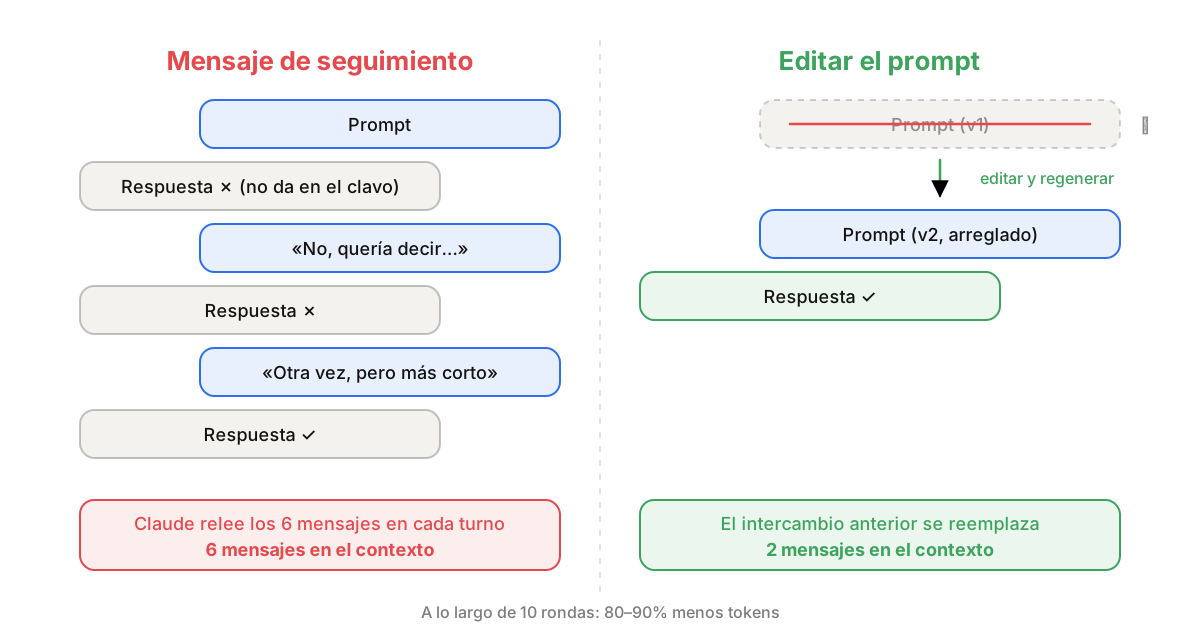
When the answer misses the mark, don't write "no, I meant…". Hit the edit icon on your original message, fix the prompt and regenerate. The previous exchange disappears instead of being added to the history.
It sounds silly, but over ten rounds this single habit cuts usage by 80–90%. Fix the prompt. Don't stack the chat.
2. Start fresh every 15–20 messages
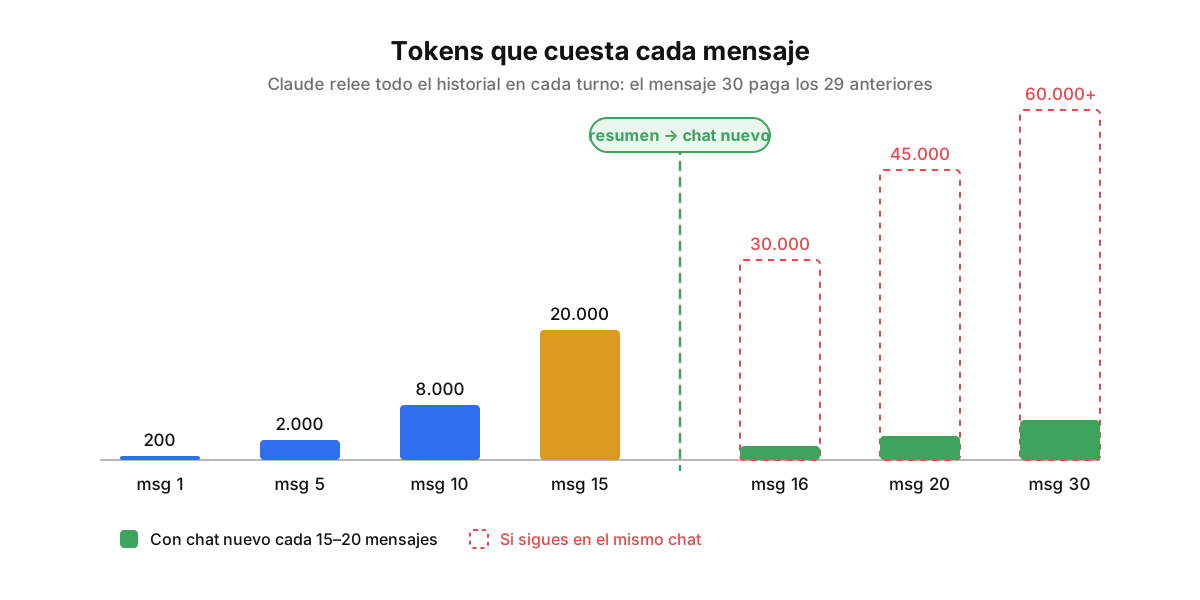
This is the hidden cost nobody talks about: Claude rereads the whole conversation on every turn. Your first message costs about 200 tokens. By message 30, a one-line question can cost more than 50,000, because it drags everything before it.
Ask Claude for a summary of where you are, copy it, open a new chat and paste it. With memory on (trick 5) you barely need to paste anything: it already knows what you were doing. Long chats are expensive chats.
3. Combine several questions into one
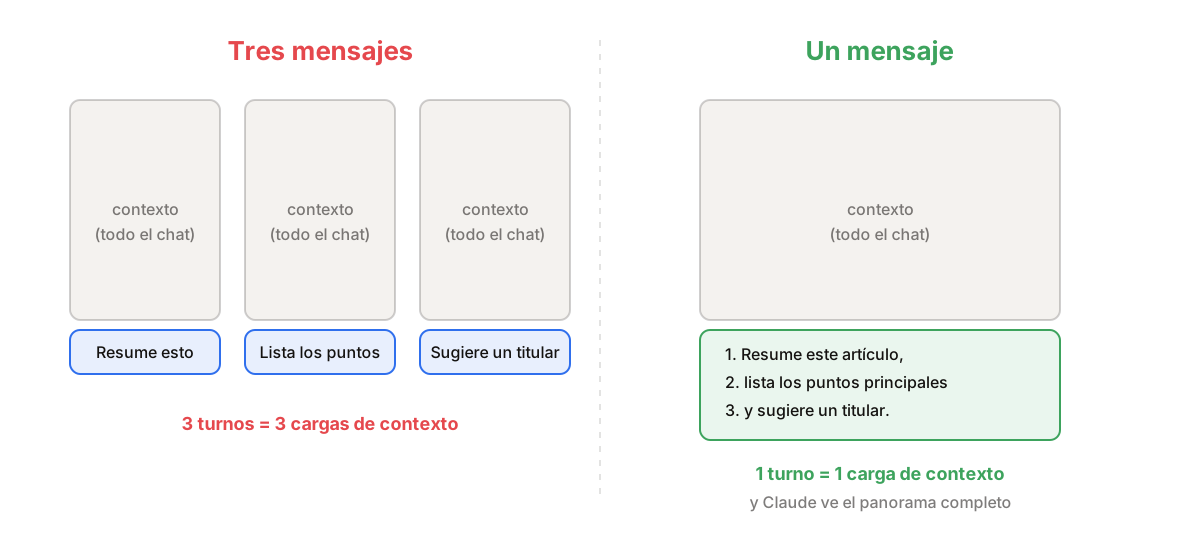
Instead of sending three separate messages, group them: "Summarise this article, list the main points and then suggest a headline". One turn instead of three means one context load instead of three.
And the answers are usually better, because Claude sees the full picture from the start. Three questions. One message. Always.
4. Upload recurring files to a Project
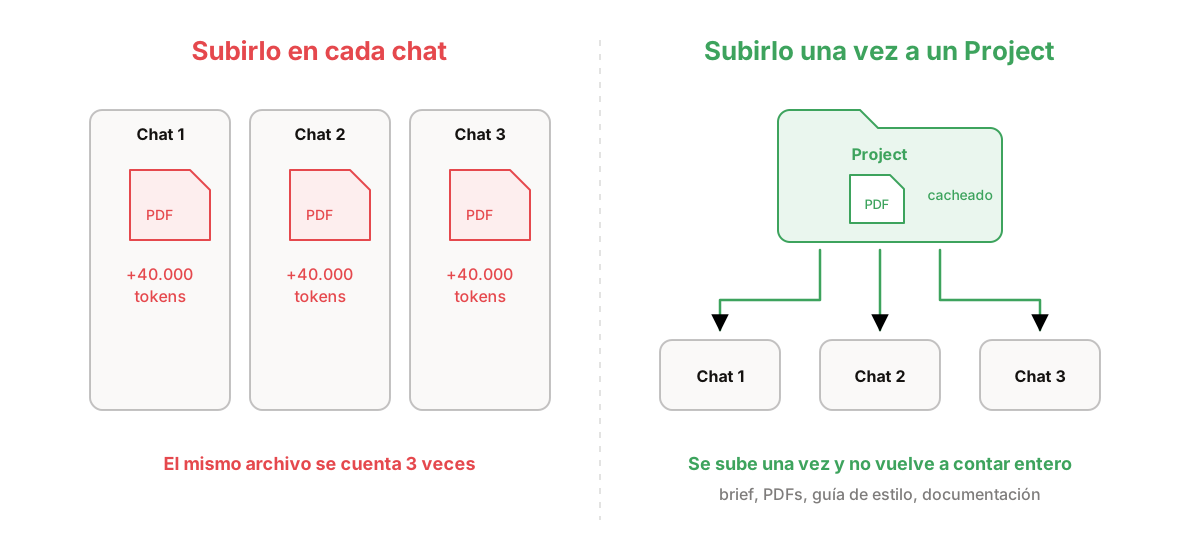
If you upload the same PDF, brief or style guide in several chats, Claude is counting those tokens again every time. Projects (in the sidebar) keep your files as project knowledge and cache them, so they no longer weigh in full on every conversation.
Since this year, when the project grows beyond what fits in the context, Claude switches to retrieving only the relevant chunks instead of loading everything. A massive saving for anyone who works with long documents. Upload it once. Stop paying every time.
5. Set up memory and custom instructions
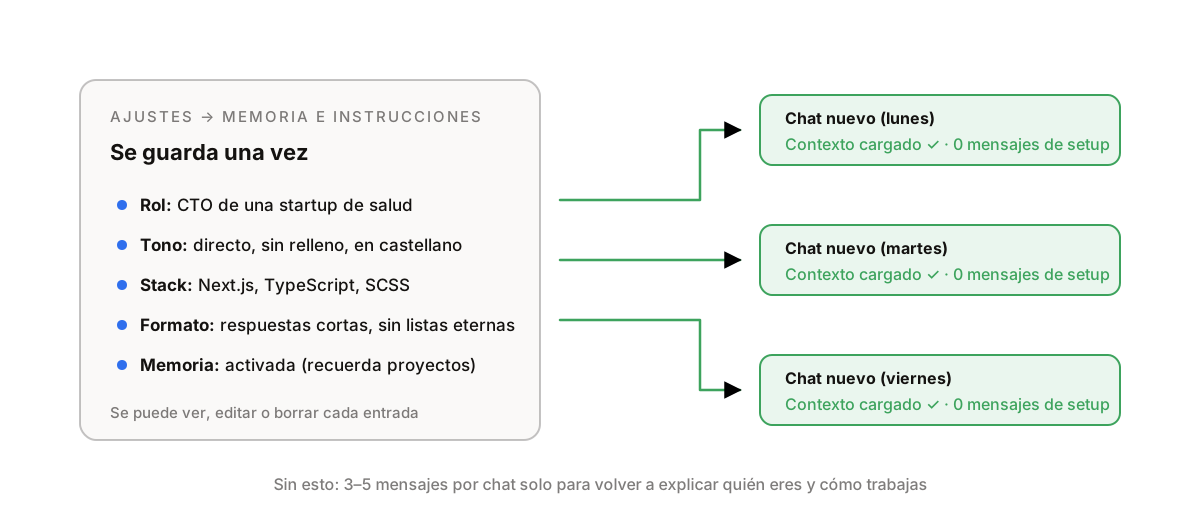
Every conversation you start without context burns 3–5 messages just to re-explain who you are and how you work. Go to Settings → Memory and save it once: your role, your tone, your stack, your pet peeves. Claude carries it into every new chat automatically.
Important update: since March, memory is no longer only for paid plans, it is available to everyone, and you can view, edit or delete every single thing it remembers. Set it up once. It works forever.
6. Turn off the features you are not using
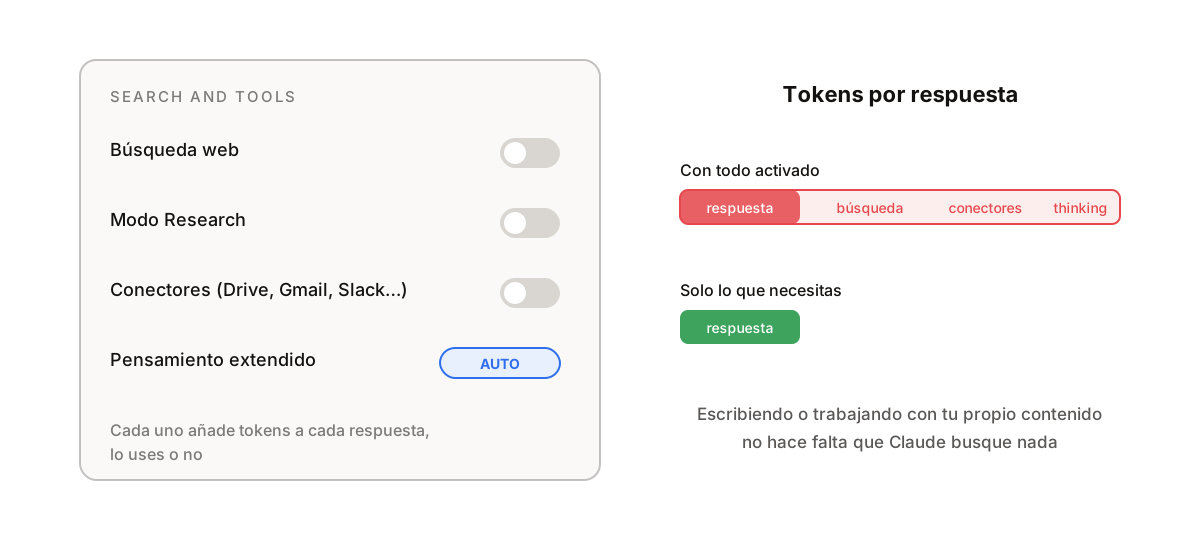
Web search, Research mode and connectors (Drive, Gmail, Slack…) add tokens to every answer even when you don't need them. When you are writing or working with your own content, switch off "Search and tools".
Extended thinking has a new nuance: current models decide on their own how much to think depending on the question (they call it adaptive), so in automatic mode it no longer wastes reasoning on a simple prompt. Leave it on auto and turn it up by hand only when the first attempt wasn't good enough. If you didn't switch it on, switch it off.
7. Use Haiku for simple tasks all day long
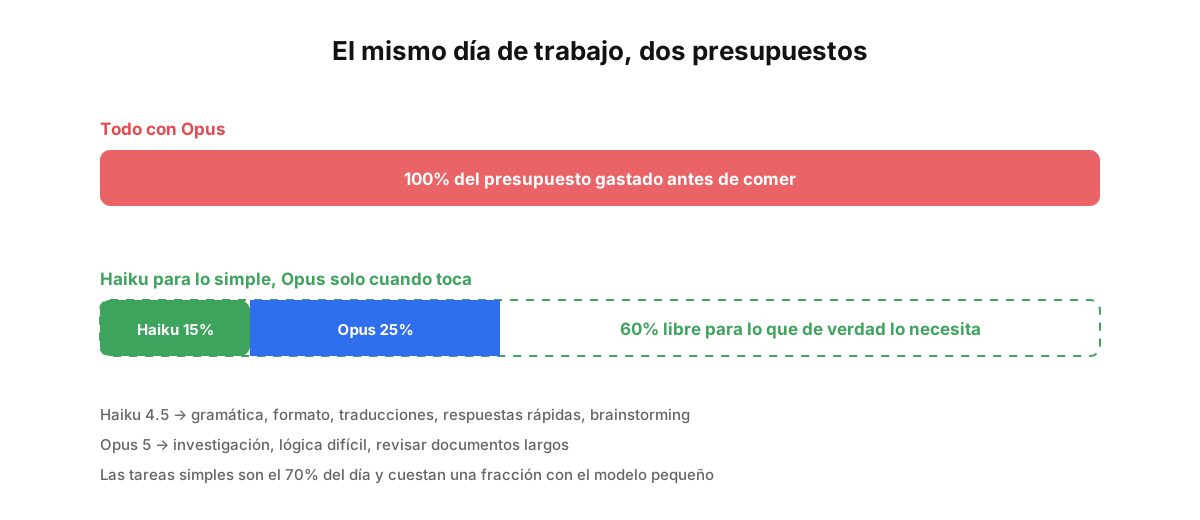
Haiku 4.5 handles grammar checks, quick answers, brainstorming, formatting and translations at a fraction of the cost of Sonnet or Opus. And the same goes for your subscription: each model eats your limit in proportion to what it costs.
Haiku all day for simple work frees up 50–70% of your budget for the tasks that genuinely need a big model. It is the highest-impact decision you can make, and the one fewest people make.
8. Spread your work across the day
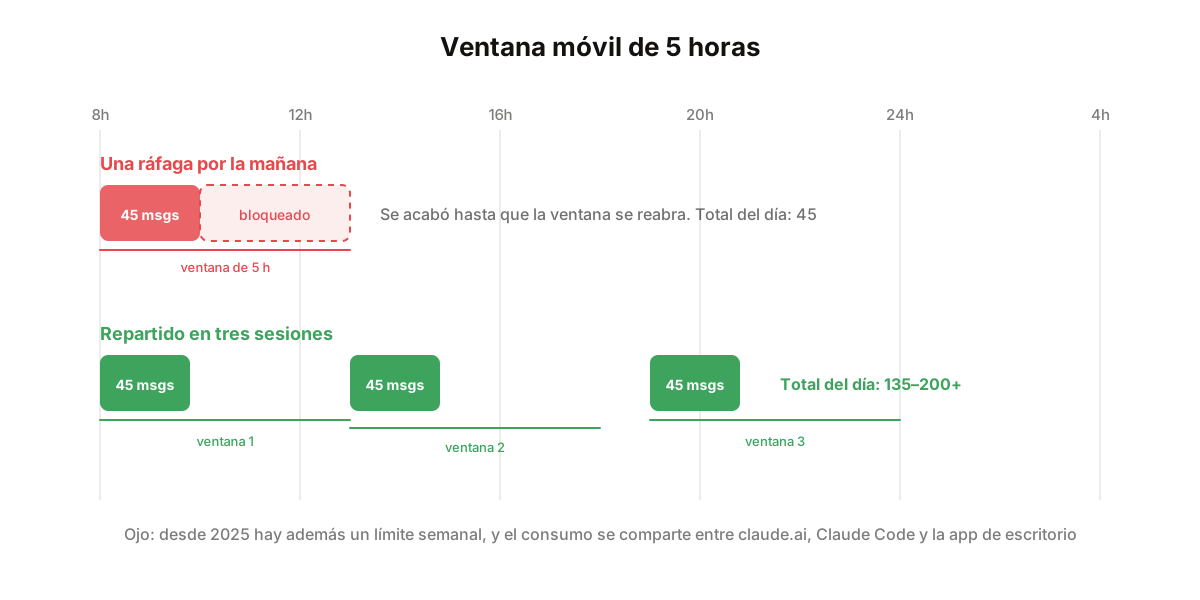
Claude runs on a rolling 5-hour window that resets continuously. If you burn your limit in a single morning session, you are done until the window reopens. Split the work into 2–3 sessions a day and on a Pro plan you go from about 45 messages to 150–200.
Two things have changed: there is now also a weekly limit shared across claude.ai, Claude Code and the desktop app, so pacing matters at the week level too. And in May Anthropic doubled Claude Code's 5-hour limit and removed the peak-hour reduction, so if you stopped using it because of that, try again. Don't sprint. Pace yourself.
9. The highest-impact decision: use the right model
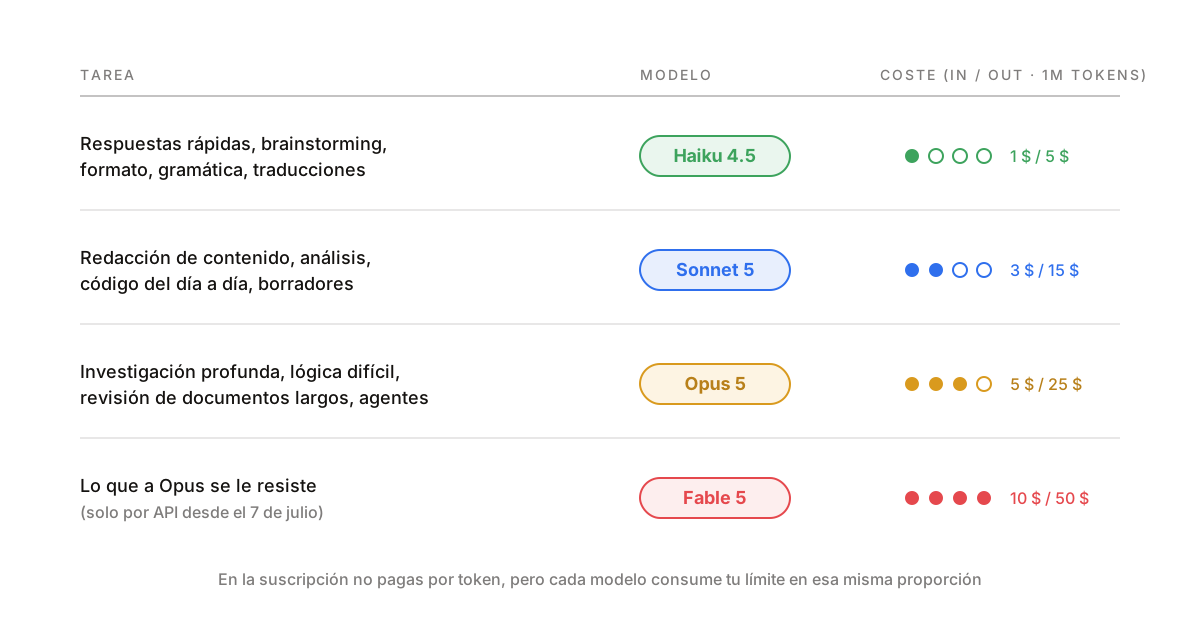
Quick answers, brainstorming, formatting and grammar → Haiku 4.5. Writing, analysis, everyday code and drafts → Sonnet 5. Deep research, hard logic and reviewing long documents → Opus 5.
And Fable 5, the most capable model, is no longer part of the subscription since 7 July: API only, pay per use, at $10 per million input tokens and $50 output. Save it for what Opus can't crack. "Haiku for drafts. Sonnet for real work. Opus for the hard stuff."
10. In Claude Code: see what weighs and compact before it blows up
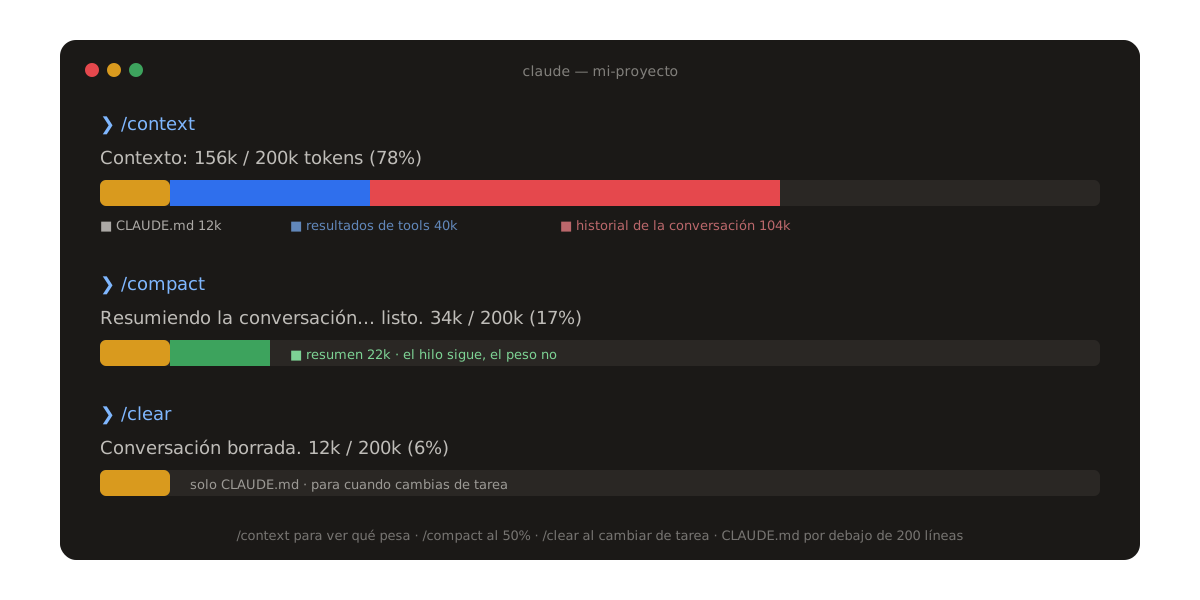
If you code with Claude Code, trick 2 has a terminal version. Type /context to see what is filling the window (usually the history and tool results, not your code). Past 50%, /compact summarises the conversation and keeps the thread without the weight. When you switch tasks, /clear and start clean.
And watch your CLAUDE.md: it loads in full with every message. Keep it under 200 lines. If you want to go one step further, plugins like caveman make Claude answer tersely and save another good chunk; I cover them in the article on the 5 Claude Code plugins.
/context   → what is filling the window
/compact   → summarise and continue (past 50%)
/clear     → wipe and start over (when switching tasks)
/usage     → how much of your limit you have used
Summary
- Edit the prompt, don't stack the chat.
- New chat every 15–20 messages.
- Three questions, one message.
- Recurring files go in a Project.
- Memory and instructions set up once.
- Turn off search, Research and connectors when not needed; thinking on auto.
- Haiku for the simple stuff, all day.
- 2–3 sessions a day, and mind the weekly limit.
- Haiku / Sonnet / Opus by task; Fable only via API.
- In Claude Code: /context, /compact, /clear and a short CLAUDE.md.
None of these tricks gives you truly infinite tokens. But together they make the limit stop being your problem, which in practice is the same thing.