9 frontend skills you absolutely need in 2026
Frontend has moved to the server, stopped repainting everything and finally has proper design tools of its own. Here is what you need to know.
1. Server Components and streaming
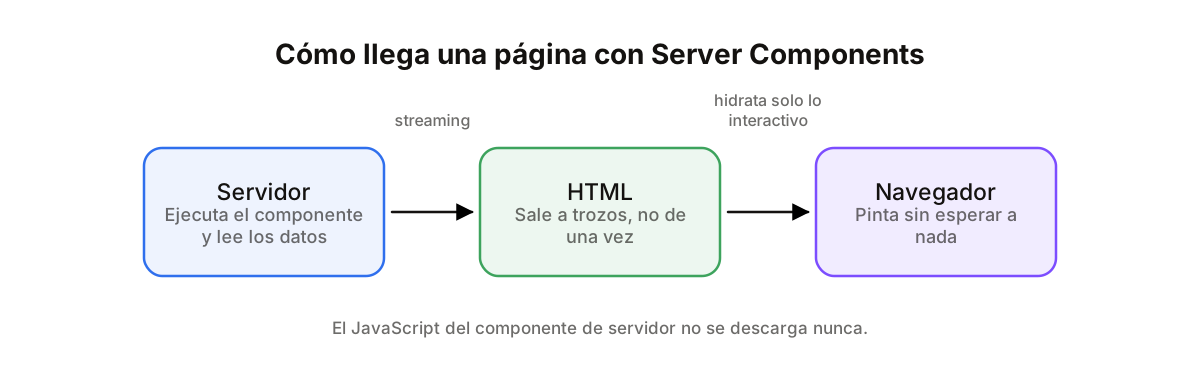
For years everything was painted in the browser: the server sent an empty HTML file and a pile of JavaScript that did the rest. The price is a blank screen while all that code downloads and runs, and the bill is always paid by the slowest phone.
A server component runs earlier, where the data lives, and sends finished HTML. Its JavaScript never travels to the browser. And with streaming there is no need to wait for all of it: the page arrives in chunks and the first part is visible while the second is still cooking.
2. Signals and the end of the re-render
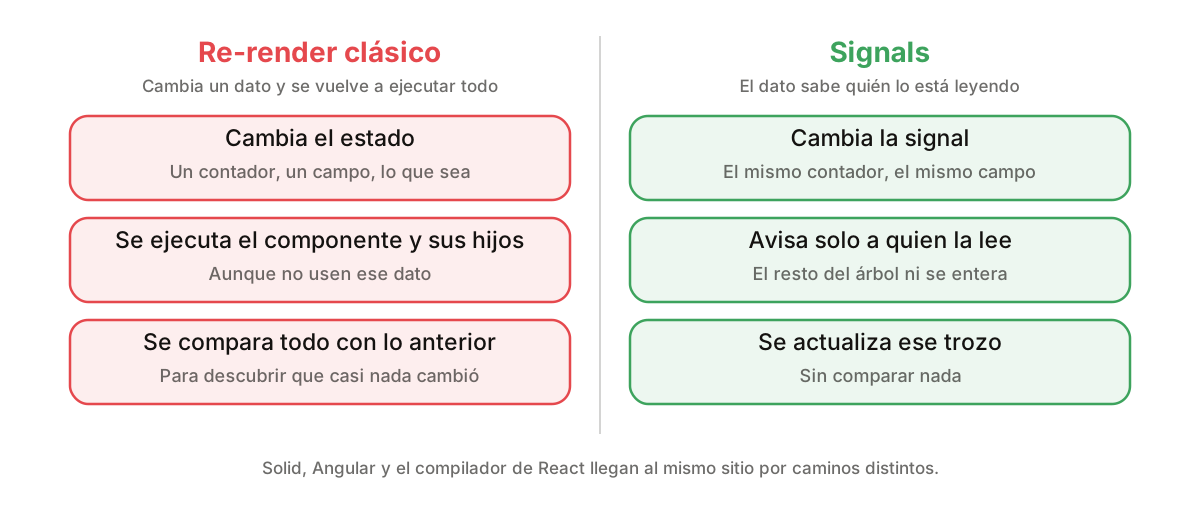
In the classic model, when a piece of state changes the framework re-runs that component and everything hanging below it, then compares the result with what was there to work out what actually changed. It works, but it does extra work, and you end up patching it to do less.
A signal is a value that knows who is reading it. When it changes it notifies only those places, and nothing else re-runs. Solid has done this from day one, Angular adopted it and React arrived at the same place by another route with its compiler. The name does not matter: the idea is identical.
3. Modern CSS: container queries and :has()
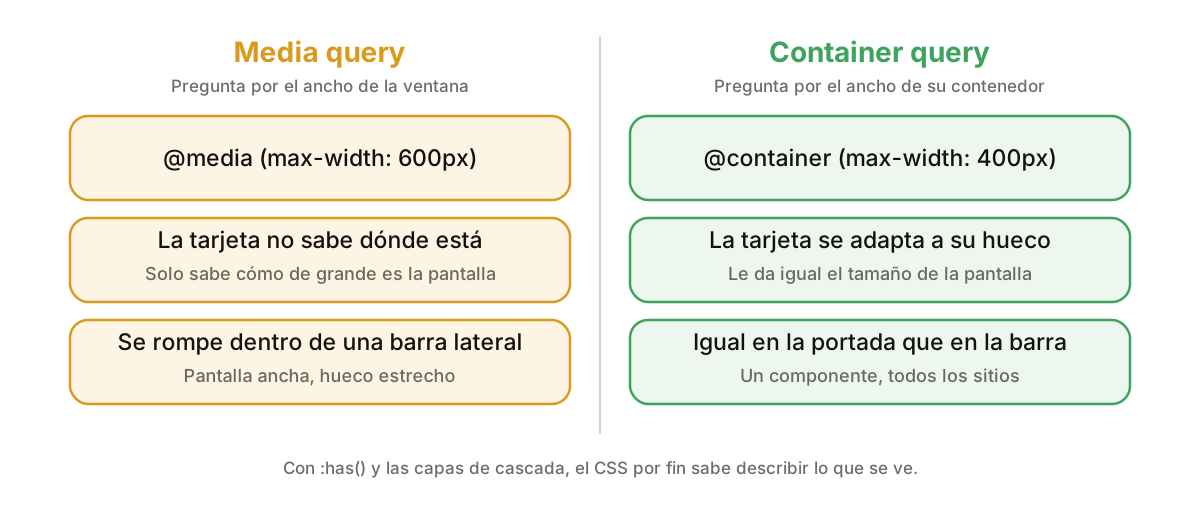
A media query asks how wide the window is. The problem is that your card does not care about the window: what it needs to know is how wide the slot it was dropped into is, and that slot is not the same on the homepage as inside a sidebar.
A container query asks exactly that, and the component stops depending on where you put it. Add :has(), which finally lets you style a parent based on what it contains, and cascade layers to decide who overrides whom. Between the three they wipe out half the CSS you used to write to fight yourself.
4. Core Web Vitals, and INP above all
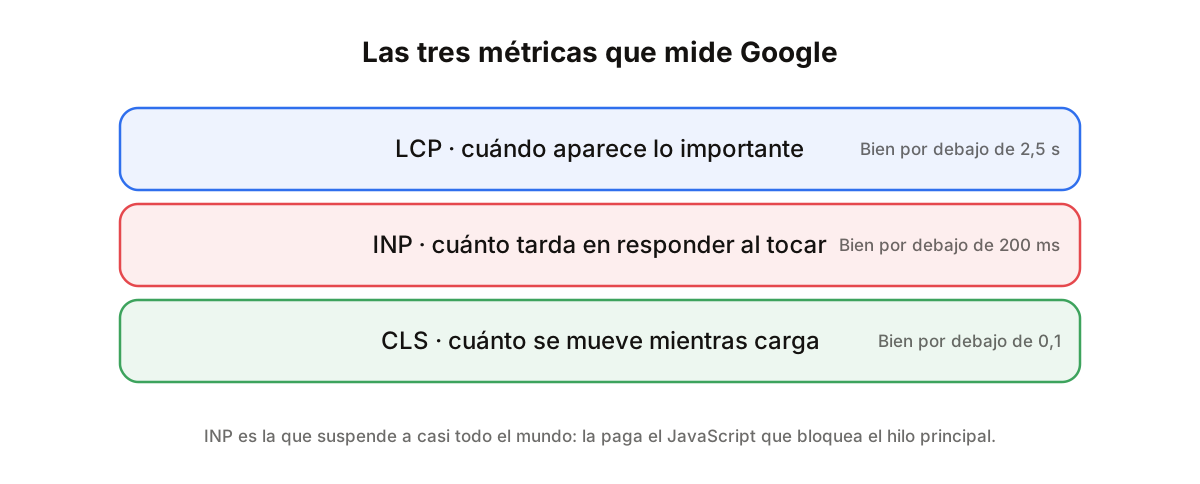
Core Web Vitals are three numbers Google uses to measure whether your page feels fast. LCP: how long the important thing takes to show up. CLS: how much the content shifts while it loads, which is what makes you tap the wrong button. And INP, which replaced the old FID and is the hardest one to pass.
INP measures how long the interface takes to respond when the user touches something: from the click to the change appearing on screen. If your JavaScript blocks the main thread it shows up here, and no cache will hide it. And this is not an SEO thing: it is literally whether the site feels good or merely okay.
5. Accessibility for real
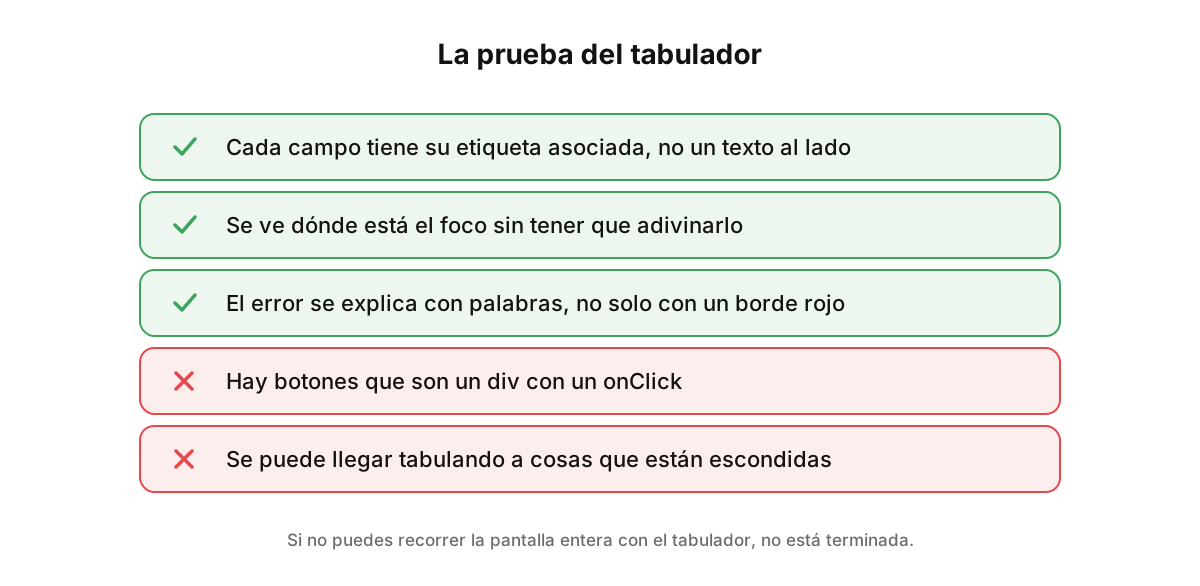
Accessibility is not spraying aria-label over everything. It is being usable without a mouse, showing where the focus is, giving every field an associated label, and describing errors in words rather than with a red border alone, because whoever cannot tell red apart will never see it.
You can check it in two minutes: walk your whole screen with the tab key. If you cannot reach something, or you cannot tell where you are, you already have work to do. And there is a bonus: almost everything you fix for accessibility improves your markup, and with it what Google and the AI search engines understand.
6. The View Transitions API
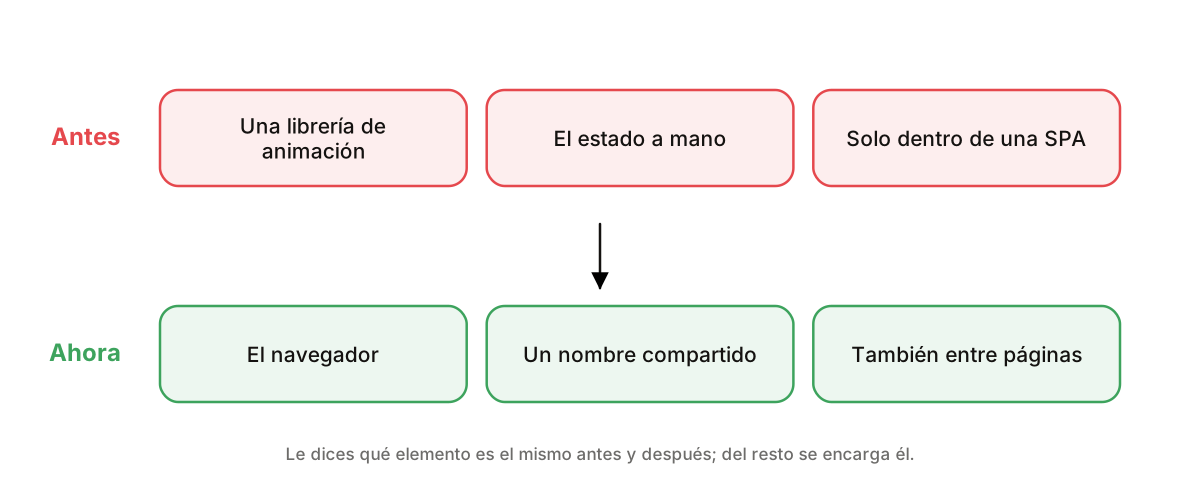
Animating a screen change is the exact point where a website gives itself away next to an app: the content jumps and you can tell you are in a browser. Until recently, fixing it meant a library, wiring the state by hand and crossing your fingers.
The View Transitions API lets the browser do it. You tell it that this element on the old screen and that one on the new screen are the same thing, and it interpolates between them. And it works across separate pages, not only inside a single-page app. It is the cheapest thing you can do to make something look expensive.
7. Rendering strategies: SSG, ISR, SSR and PPR
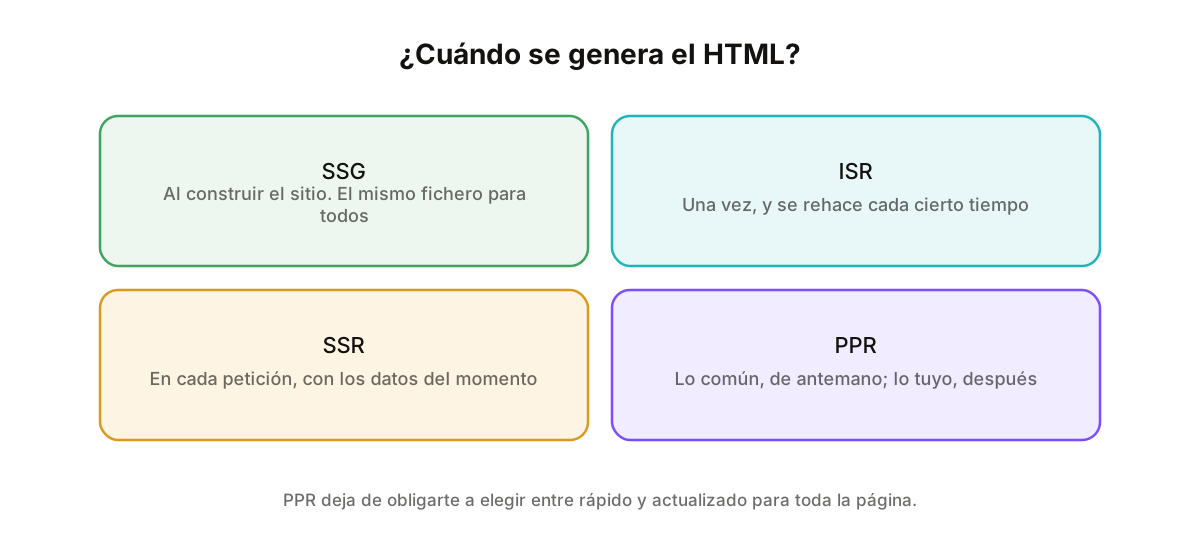
The acronyms are scary, but there is only one question: when does the HTML get generated? SSG generates it when the site is built and serves the same file to everyone. ISR generates it once and rebuilds it every so often. SSR generates it on every request, with fresh data.
PPR is the one to understand this year, because it splits the page in two. Whatever is the same for everyone is generated ahead of time and comes out instantly; the personalised bit — your cart, your name, your balance — is filled in afterwards. You stop having to choose between fast and fresh for the whole page.
8. TypeScript for real
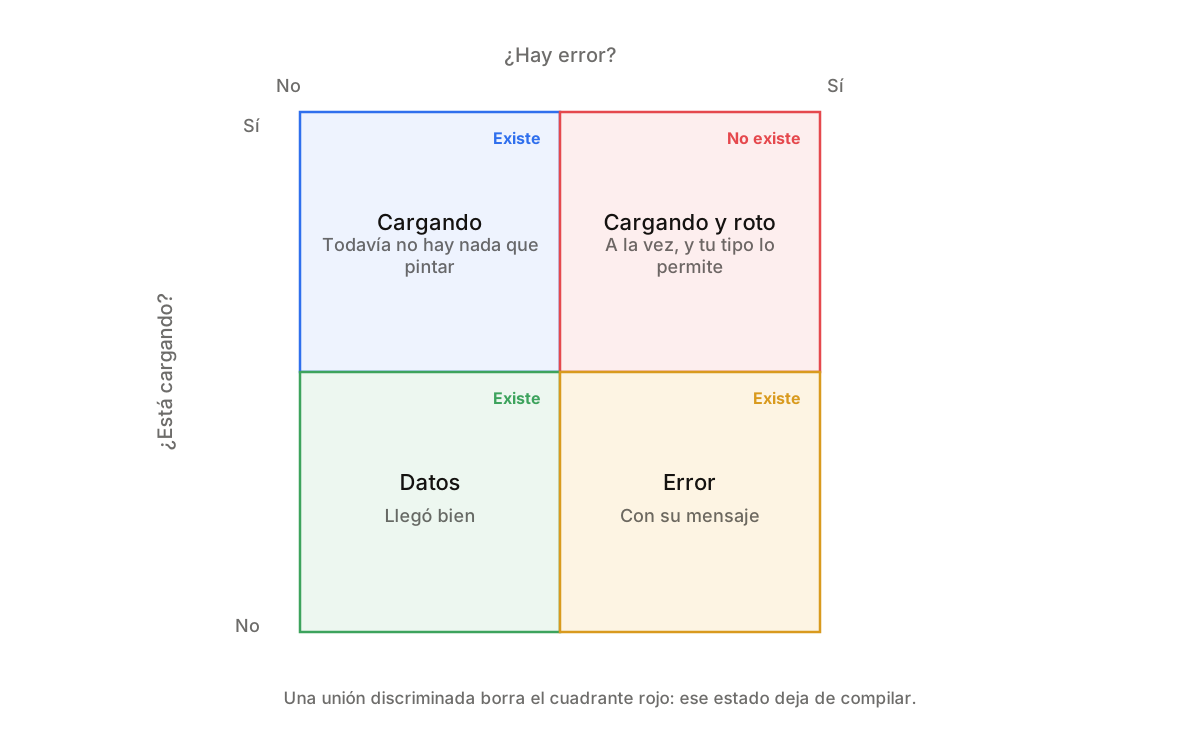
Almost everyone uses TypeScript as a spell checker: they type the parameters and move on. Using it for real is something else: it is making impossible states impossible to write in the first place.
The classic example is a request with isLoading, data and error all at once: that type allows being loading and broken at the same time, which never happens. A discriminated union — loading, or data, or error with its message — makes that case fail to compile. Derive your types from your data instead of writing them twice and any disappears on its own.
9. UI testing with Playwright
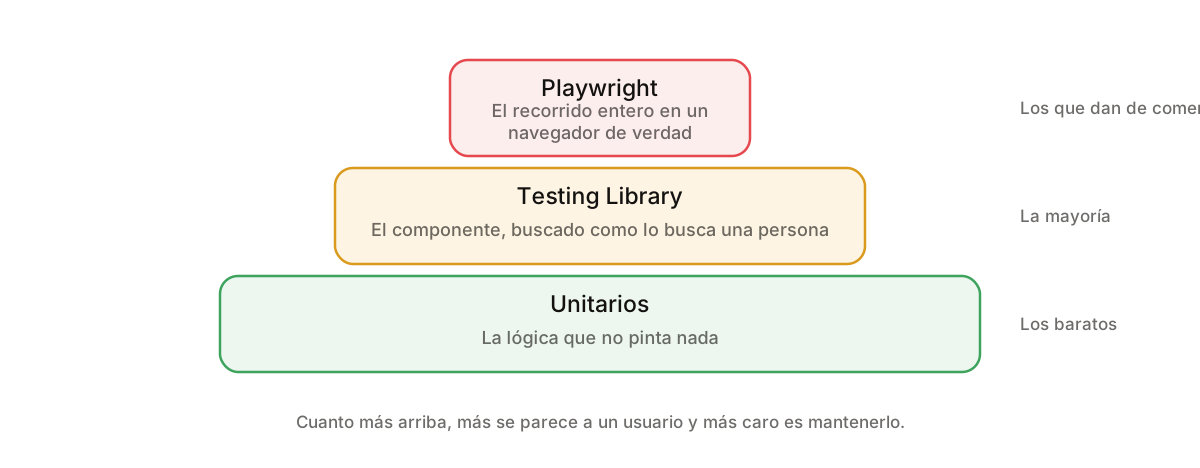
Testing frontend is not checking that a function adds up. It is checking that the user can do what they came to do. Testing Library goes that way: you find elements the way a person does, by their text and their role, never by a CSS class.
Playwright is the level above: it opens a real browser, walks the whole journey and tells you if something moved. Few and well chosen, the flows that pay the bills: sign-up, checkout, the main form. Everything else with component tests, which run a thousand times faster and do not break on their own.
Summary
- Server first: whatever never reaches the browser costs nothing.
- Signals: only whatever reads the changed value updates.
- Container queries instead of media queries.
- INP is the metric that will fail you.
- The tab key is the two-minute accessibility test.
- View Transitions: the expensive look, for free.
- PPR: fast and fresh on the same page.
- Types that forbid impossible states.
- Playwright only for the flows that pay the bills.
None of the nine is learned in an afternoon, and none needs to be. But the frontend of 2026 looks very little like the one from three years ago: it moved to the server, it stopped repainting everything and it finally has design tools inside CSS itself. Once you know what each one is and when it applies, practice takes care of the rest.