9 security skills you absolutely need in 2026
The nine things a developer has to know so as not to be the door they come in through. Explained without jargon, one diagram each.
1. The OWASP Top 10
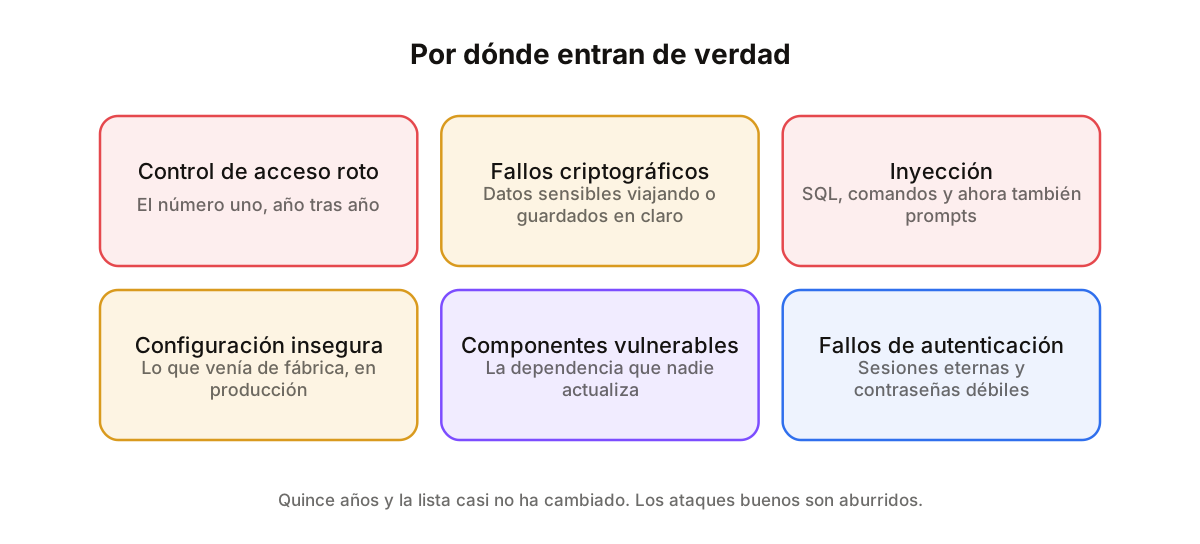
Every few years OWASP publishes the list of the ten most common security flaws in web applications. It is not a treatise: it is ten concrete things, and they have been roughly the same for fifteen years, which says a fair amount about all of us.
Reading it end to end takes an afternoon and saves you most of the pain, because real attacks are hardly ever sophisticated. They do not arrive with a novel technique: they come in through the access check nobody wrote, the library that has not been updated in three years, or the configuration left exactly as it shipped.
2. Injection: SQL, commands and prompts
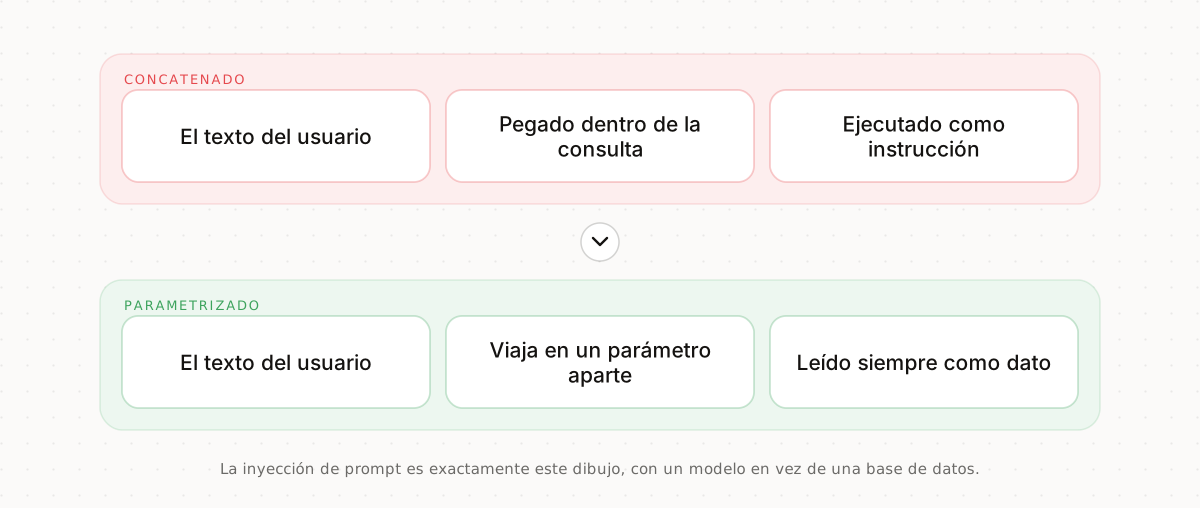
Every injection is the same mistake told different ways: mixing data that came from outside with instructions that are about to run. If you paste what the user typed into a SQL query, what the user typed is SQL.
The fix was settled decades ago and never changes: parameterised queries. The data travels separately and is never read as an instruction. And in 2026 there is a new version of the same problem: prompt injection. If you drop user text into a model's instructions, that text is instructions. Same flaw, fifty years later.
3. Broken access control and IDOR
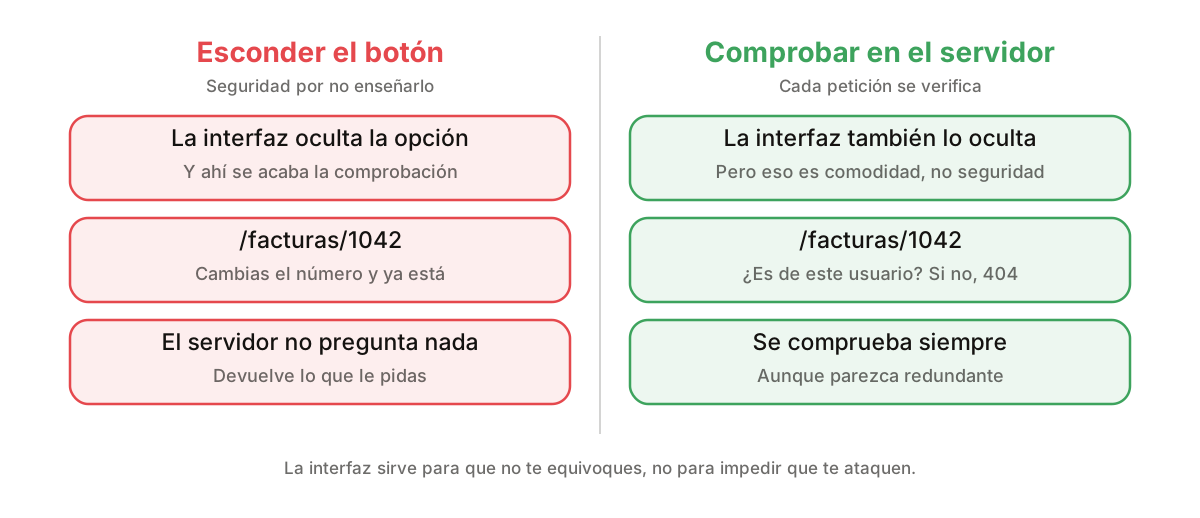
It is the number one flaw on the list and also the easiest to commit. You hide the "view invoice" button from whoever should not see it, you relax, and it turns out the invoice still sits at a URL with a number on the end that anyone can change.
That is an IDOR: a direct object reference with no permission check. The rule is uncomfortable but short: every request checks whether this specific user may do this specific thing to this specific record. On the server, always, even if the interface already prevents it. The interface is not a security control.
4. Modern authentication
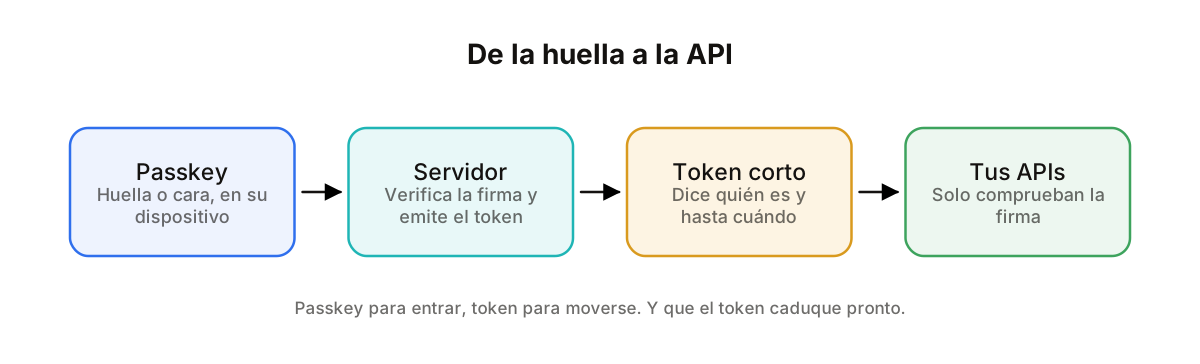
Passwords get forgotten, leaked and above all reused: the one your user has on your app is the one they had on a forum that leaked in 2019. A passkey is a key that lives on their phone and unlocks with a fingerprint or a face. There is nothing to steal because there is nothing to type.
Once inside, the server hands over a signed token saying who they are and how long it is good for. With it they call your APIs and those only check the signature. Two details almost everyone skips: make the token short-lived and refreshable, and do not store it anywhere a script on the page can read it.
5. Secret management
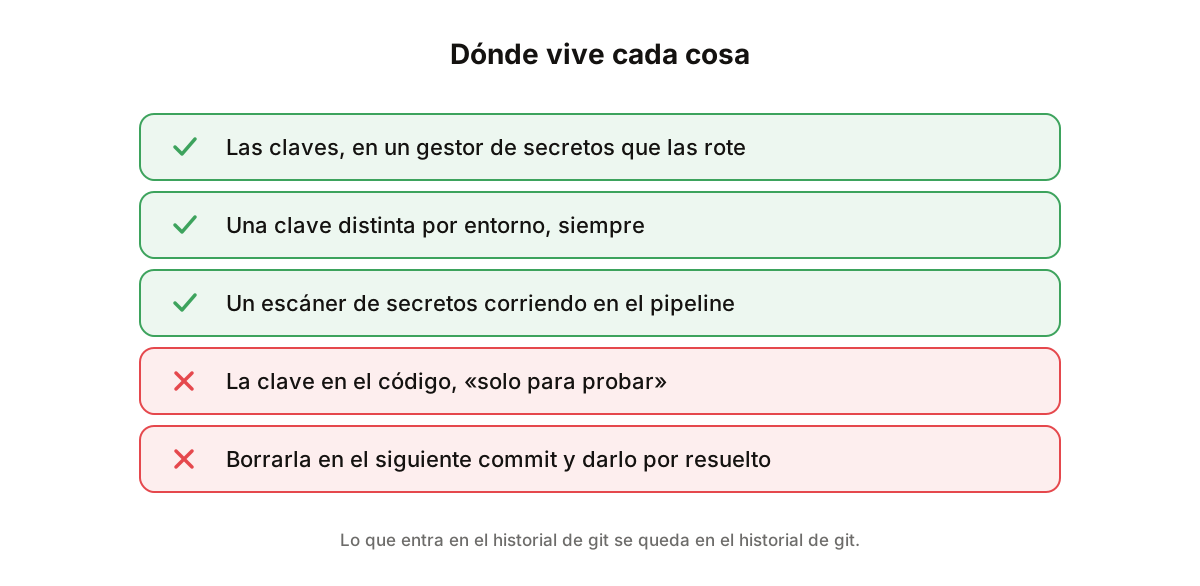
API keys in the code are by a distance the silliest way to get breached. And deleting them in the next commit does not help: they stay in git history forever, and there are bots crawling GitHub that find them in minutes.
They belong in environment variables or, better, in a secret manager that rotates them for you. Three bonus rules: a different key per environment, an example file with the names but not the values, and a secret scanner in the pipeline so the next one never gets pushed at all.
6. Encryption: in transit, at rest and in use
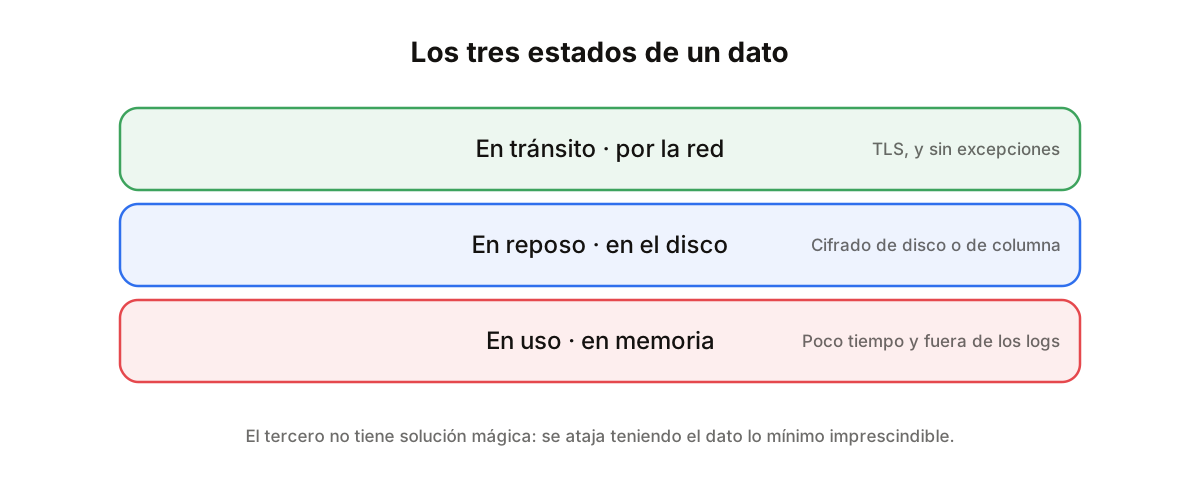
A piece of data passes through three states and each is protected differently. In transit, while it crosses the network: that is TLS, and there is no debate any more, it goes on everything. At rest, while it sits on a disk: that is disk or column encryption, and it is what makes a stolen backup worthless.
The third is the one almost nobody considers: in use, while the data is decrypted in memory so you can work with it. That is where half of all leaks happen and there is no silver bullet: you limit it by holding the data as briefly as possible, keeping it out of your logs, and not sending it where it is not needed.
7. The supply chain
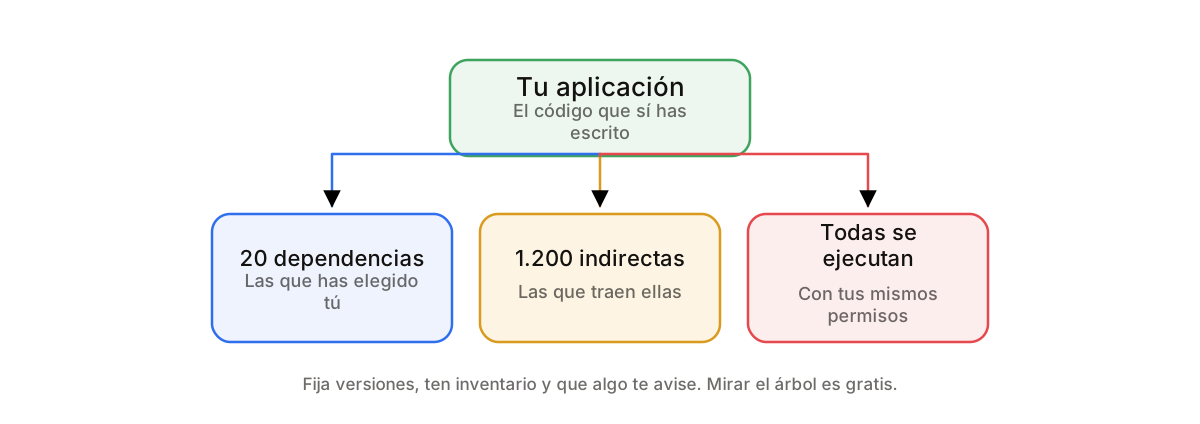
Your application is not just your code. You install twenty dependencies, each brings its own, and you end up running in production the work of people whose names you have never read. That is the supply chain, and it is where the loudest attacks of recent years came in.
The answer is not to stop using libraries, it is to look at the tree. Pin your versions, review what updates, keep an inventory of what you run and put something automatic in place to warn you when a vulnerability lands. And before installing: check when it was last updated and how many people maintain it.
8. Zero Trust
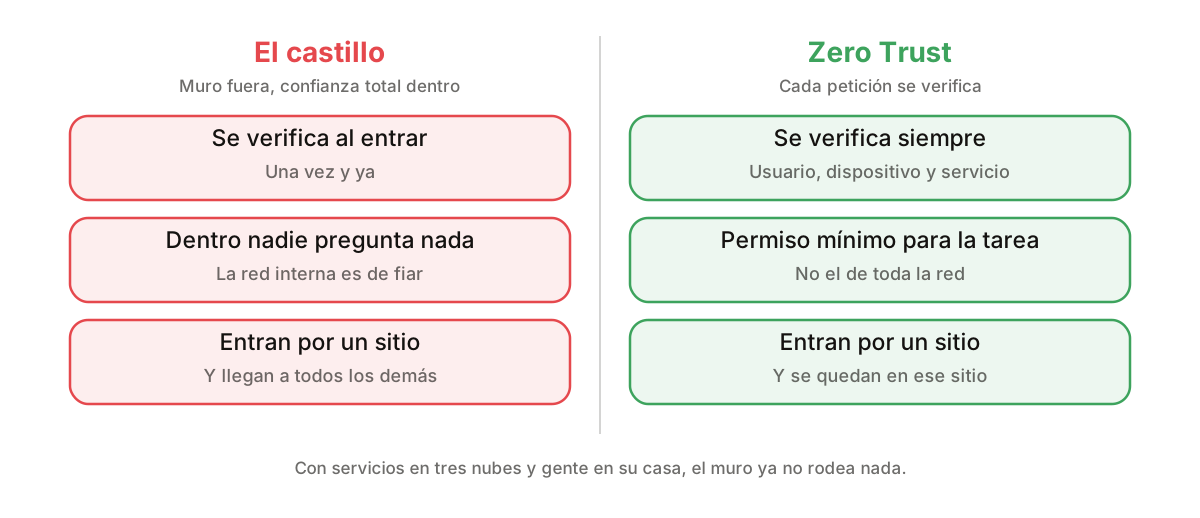
The old model was a castle: a strong wall outside and total trust inside. It worked when everything lived in one office. Today you have services in three clouds, people working from home and vendors plugged into your network, so the wall no longer surrounds anything.
Zero Trust is the opposite posture: trust nobody for being inside. Every request is verified, whether it comes from a user, a device or another of your own services. And everyone gets the minimum permission for their task, not the run of the network. It sounds paranoid until someone gets in through one door and finds they can reach every other one.
9. Rate limits and abuse
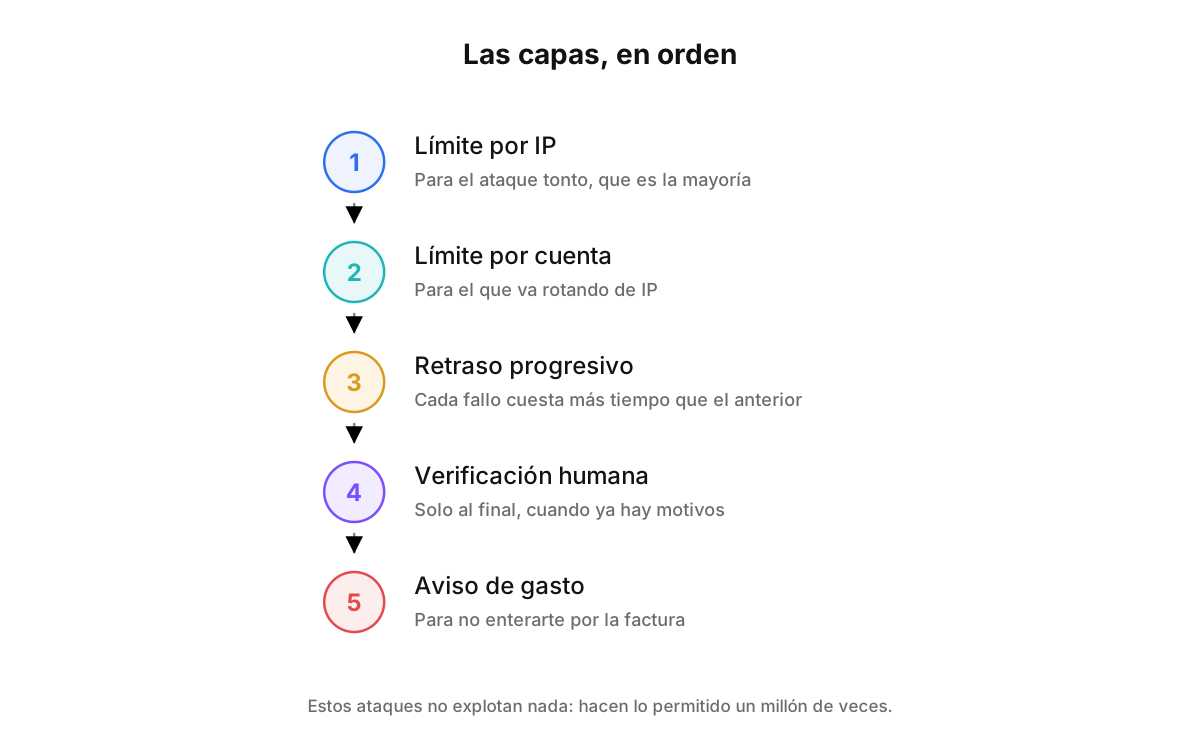
Some attacks exploit no flaw at all: they simply do the permitted thing an enormous number of times. Trying passwords, requesting SMS codes you pay for, or burning through your AI budget in an afternoon. With no limit, all of that is free for whoever does it.
You defend in layers, each catching what the previous one let through: a per-IP limit for the dumb stuff, per-account for whoever rotates IPs, progressive delays after repeated failures, and a human check only at the end, once there is reason for it. Plus something that alerts on a spend spike: the worst part of these attacks is finding out from the invoice.
Summary
- OWASP: fifteen years and much the same list.
- Every injection is mixing data with instructions.
- Check permissions on the server, not by hiding the button.
- Passkey to get in, short-lived token to move around.
- No key in the repository, ever.
- Encrypt in transit and at rest, and hold the data briefly in memory.
- Look at the dependency tree: it is a thousand, not twenty.
- Zero Trust: being inside is not a credential.
- Set limits, or someone will do the permitted thing a million times.
Security is not a department that turns up at the end to say no. It is a way of writing code, and nearly all of it fits in one sentence: trust nothing that came from outside, and always check on the server. If you only take one of the nine, take access control: it has been number one on the list for as long as the list has existed.