GEO: how to show up in ChatGPT, Claude and Gemini
Each AI searches somewhere different. Where each one looks, the sitemap you need and how to submit it to Google, Bing and Brave.
| AI | Where it searches | Its bot | What you need to do |
|---|---|---|---|
 ChatGPT ChatGPT |  Bing and its own index Bing and its own index | OAI-SearchBot | Submit your sitemap to Bing |
 Copilot Copilot | Bing | Bingbot | Same as ChatGPT |
 Claude Claude |  Brave Brave | Claude-SearchBot | Submit your site to Brave |
 Gemini Gemini |  Google Google | Googlebot | Submit your sitemap to Search Console |
 Perplexity Perplexity | Its own index | PerplexityBot | Let it in through robots.txt |
That's the whole point: ChatGPT, Claude and Gemini don't search in the same place. If you're only on Google, Claude and ChatGPT may never see you.
What GEO is
GEO (Generative Engine Optimization) is SEO for AI: getting ChatGPT, Claude or Gemini to find you, read you and recommend you when someone asks. You'll sometimes see it called AEO: they started out a little differently (AEO was about Google's featured snippets and voice assistants), but today they're used almost as synonyms.
1. Have a sitemap
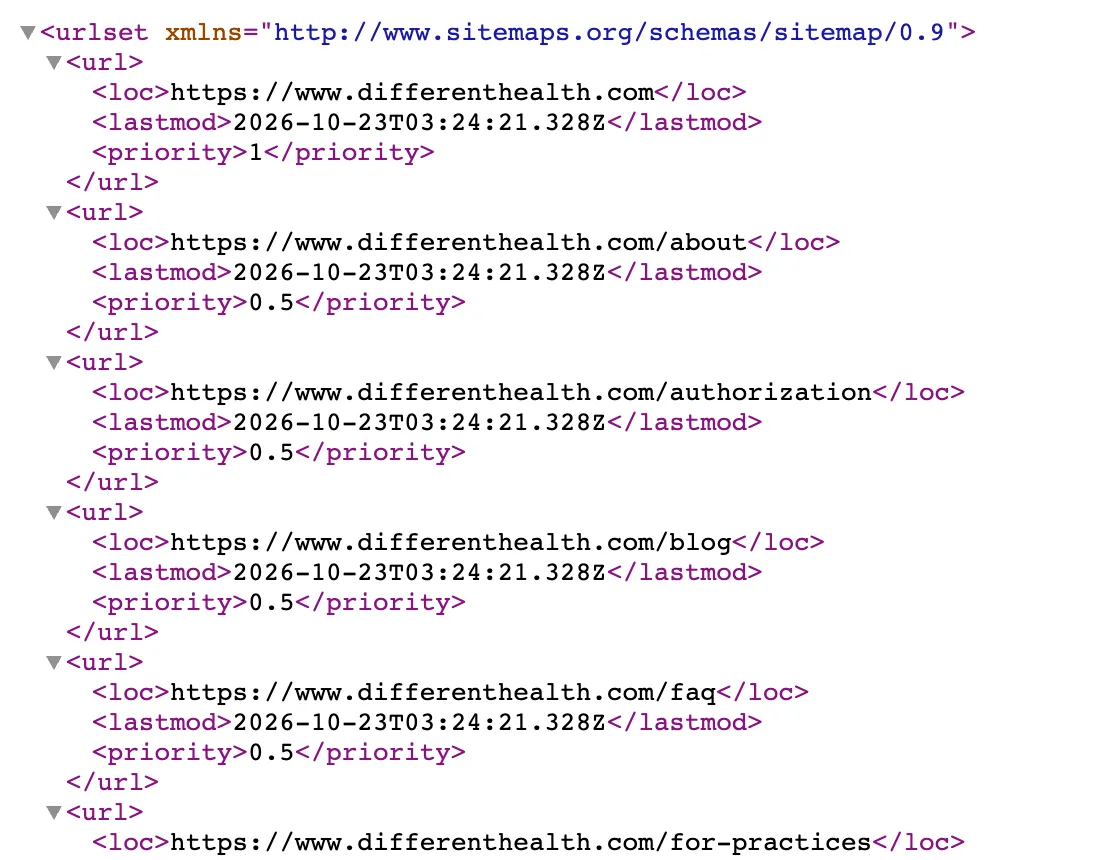
What it is. A file at yourdomain.com/sitemap.xml listing every page on your site. Open it in the browser and it looks like the screenshot.
Why. Without it, a search engine finds your pages by following links, whenever it gets round to it, if it ever does. With it, you hand over the full list and tell it what changed and when. It's what you'll submit in the next three steps.
How. Almost everything generates it for you: WordPress with Yoast or Rank Math, Shopify, Wix and Webflow out of the box, and Next.js with an app/sitemap.ts. Check it exists by opening yourdomain.com/sitemap.xml. If you get a list like the one above, you're set.
2. Choose which bots get in
In your yourdomain.com/robots.txt, let the search bots in, keep the training bots out if you don't want models learning from your site, and point to the sitemap:
# Search bots: allowed, except private areas
User-agent: Googlebot
User-agent: Bingbot
User-agent: OAI-SearchBot
User-agent: Claude-SearchBot
User-agent: PerplexityBot
Allow: /
Disallow: /api/
Disallow: /account/

# Training bots: out (optional)
User-agent: GPTBot
User-agent: ClaudeBot
User-agent: Google-Extended
User-agent: CCBot
User-agent: Bytespider
Disallow: /

# Everyone else
User-agent: *
Allow: /
Disallow: /api/
Disallow: /account/

Sitemap: https://yourdomain.com/sitemap.xml
Blocking GPTBot, ClaudeBot or Google-Extended doesn't remove you from ChatGPT, Claude or Gemini: those train, they don't search. If your robots.txt has a Disallow for OAI-SearchBot, Claude-SearchBot or PerplexityBot, though, remove it.
Precautions, because robots.txt is not security:
- It's public. Anyone can read it, so don't list secret paths (/internal-panel-2024/): you're handing a map to whoever is looking for a way in. Private things go behind a login, not hidden.
- It's a request, not a lock. Good bots respect it; bad ones ignore it. To actually stop them, use firewall rules on your host (Vercel, Cloudflare) by user agent or IP.
- A user agent can be faked in one line. Anyone can claim to be Googlebot. If you give a bot special treatment, verify it by IP: OpenAI publishes its ranges, and Google and Bing are verified with reverse DNS.
- To keep something out of search, Disallow isn't enough: if someone links to it, it can still be indexed. Use noindex on the page or, better, put it behind a password.
- Open it after you deploy at yourdomain.com/robots.txt. A forgotten Disallow: / from when the site was in staging wipes you off every search engine.
3. Google Search Console (Gemini)
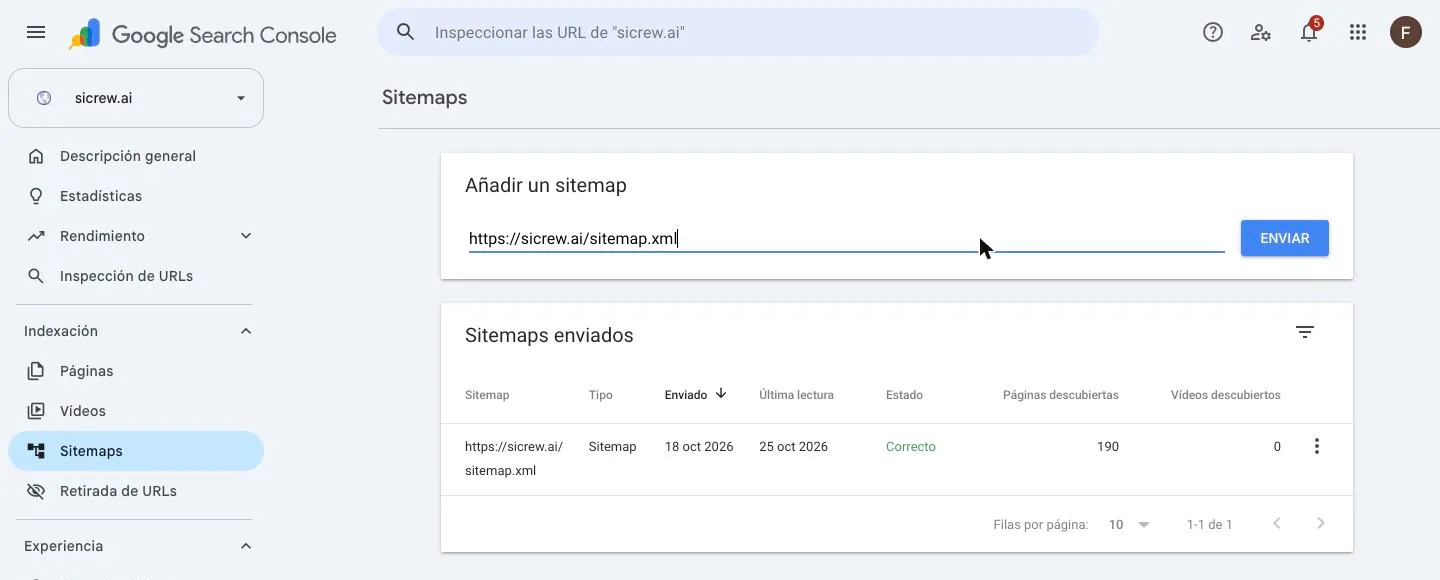
- Go to search.google.com/search-console and add your domain. It asks for a TXT record in your DNS to prove it's yours.
- In the left menu, Sitemaps.
- Paste https://yourdomain.com/sitemap.xml and hit Submit.
- Within a few days the status turns to Success and tells you how many pages it found.
4. Bing Webmaster Tools (ChatGPT and Copilot)
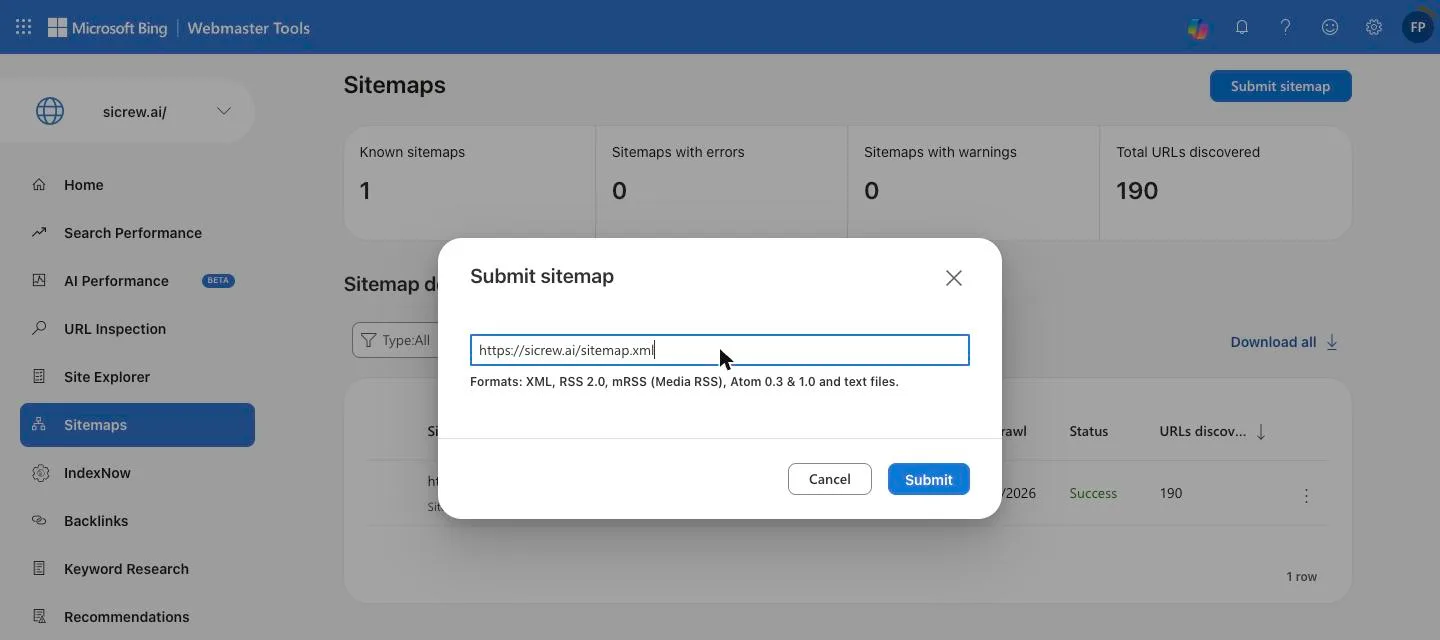
- Go to bing.com/webmasters. If you already use Search Console, choose Import and it brings over your site and sitemap from Google with nothing to verify.
- If not, add the site by hand and go to Sitemaps.
- Click Submit sitemap, paste the URL and Submit.
- While you're there, turn on IndexNow from the same menu: it pings Bing every time you publish, instead of waiting for it to come round.
5. Brave (Claude)

- Go to search.brave.com/submit-url.
- Type your site's URL.
- Hit Submit.
That's it. When Claude searches the web, your site will be among what it can find.
In short
- A sitemap at /sitemap.xml and a robots.txt pointing to it.
- That sitemap in Search Console for Gemini, and in Bing for ChatGPT and Copilot.
- Your URL in Brave for Claude.
Twenty minutes, once. Do it today, and when an AI recommends you, tell me on Instagram.